Skip to content

Edit a Data Contract

Entropy Data edits data contracts in the Data Contract Editor — a browser-based editor for the Open Data Contract Standard (ODCS), and the default editor for ODCS contracts.

Open the editor

  1. In Studio, open a data contract — from Studio → Data Contracts, or from a data product's output port.
  2. Open the Open options menu (next to the contract title) and choose Edit.

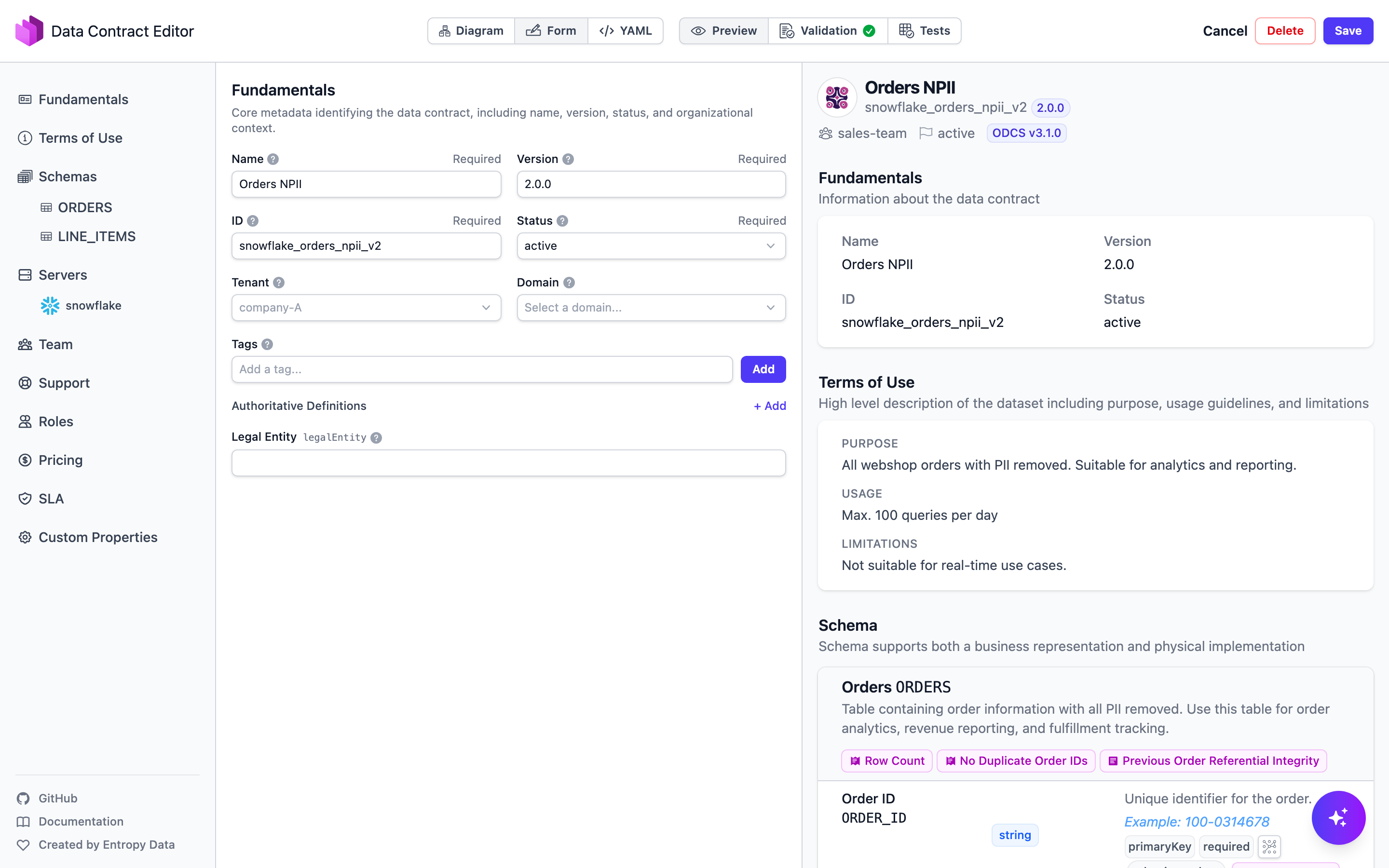
The Data Contract Editor, Form view

Views

Switch between views of the same contract from the top bar:

  • Diagram — the schema as an entity–relationship graph.
  • Form — structured fields for every part of the contract.
  • YAML — the raw ODCS YAML.
  • Preview — the contract rendered as consumers see it.
  • Validation — validates the contract against the ODCS schema and flags problems.
  • Tests — data-quality test results for the contract.

What you can edit

The left panel groups the contract's ODCS sections:

  • Fundamentals — name, ID, version, status, tenant, domain, and tags.
  • Terms of Use — purpose, usage, and limitations.
  • Schemas — the models and their fields, types, descriptions, and data quality rules.
  • Servers — where the data physically lives, per environment.
  • Team, Support, Roles, Pricing, SLA, and Custom Properties — ownership, access roles, service levels, and organization-specific fields.

Add properties from Semantics and other data products

The editor includes a built-in browser for your organization's semantic model and for the data contracts of other data products. Open it with the chevron on the left edge of a schema page (Show browser), or with Add from Semantics in the Properties header. It is available on schema pages and in the Diagram view.

The browser panel on the Data Products tab, next to the schema editor

The browser has two tabs:

  • Semantics — the semantic model: namespaces, groups, concepts, and their properties, with business definitions included.
  • Data Products — an Upstream section with the data products this contract's product consumes (through access agreements or declared input ports), and All data products with every other data product you are allowed to see. Products and their output port contracts load as you expand them.

The browser panel on the Semantics tab, with link badges on already-linked elements

Drag and drop

  • Drag an element between two properties to insert it there, or onto an empty schema to add it.
  • Drop an element onto an existing property to link that property instead of adding a new one.
  • Both work in the Form view and on schema nodes in the Diagram view.

What gets written depends on the source:

  • Semantic concepts and properties are linked, not copied: the schema property references the element in its authoritativeDefinitions (preferring the concept's IRI when it has one) and inherits type, description, and examples from the semantic model. Dropping a concept adds an object property with one linked sub-property per concept property.
  • Data product properties are copied (name, type, description, classification, examples) together with their semantic links. The new property also records its lineage in the ODCS transform fields: transformSourceObjects holds a URI that references the source output port property (https://…/dataproducts/{id}?outputPortId=…#schema.property).

Stay oriented

  • Elements already used in the contract show a link badge; its tooltip names the linking properties. Hovering a linked element in the browser highlights its counterpart properties in the schema, and hovering a linked schema property highlights it in the browser.
  • Hovering any element shows a card with its details, and the open icon opens the element's details page in a new tab.

Generate code from the contract

Use Generate on a data contract to generate downstream code from it, to help implement or consume the data: SQL Select, SQL DDL, dbt sources, dbt models, JSON Schema, Pydantic models, or custom code.

To go the other way and create the schema from existing data rather than typing it by hand, generate the contract from an asset, or use Import from Excel in the contract's Open options menu.

Save

Click Save to store your changes, Cancel to discard them, or Delete to remove the contract.

To keep contracts in version control and edit them as code instead, see Connect a Git repository and Auto-push data contracts to Git.

Next steps